


CubeSmart Self Storage
3.3521.00 Reviews
App Specs
- Version
- 3.2.7
- Updated On
- License
- Free
- Downloads
- 100,000+
- Developer
- CubeSmart, L.P.
- Categories
- Business
- Platform
- Android
Screenshots
 Analysis by AppCompare
Managing a storage unit usually becomes annoying at the exact moment you are busy: you need to check something before driving across town, remember which unit holds a box, or deal with a payment task while standing in a parking lot. CubeSmart Self Storage is built for that kind of practical situation. I reviewed it as a business-focused mobile app from CubeSmart, L.P., and my overall impression is that it aims to reduce the amount of routine storage management that normally requires a browser, phone call, or visit to an office.
The app is free and suitable for everyone, which makes it easy to try without turning the decision into a financial commitment. Its audience is fairly specific, though. This is not a general organization tool, a moving planner, or a replacement for a full inventory system. It is most useful when you already use CubeSmart and want a simpler way to stay connected to your storage account. If you are comparing storage companies, the app can also help you judge whether the digital side of the service matches the convenience you expect.
How CubeSmart Self Storage feels in everyday use
I find the app most useful when I treat a storage visit as a small sequence of decisions rather than a single errand: check what I need beforehand, keep account tasks separate from box tracking, and verify any action that was interrupted. That approach helps me judge whether a mobile shortcut really saves time. It also sets up a closer look at how the app fits into an ordinary day.
A quick route to routine storage tasks
My first expectation with an app like this is not flashy design; it is speed between opening the app and finding the task I came to complete. A storage-management app has a narrow job, so unnecessary screens or unclear account paths would be especially frustrating. CubeSmart Self Storage presents itself as a focused companion rather than a broad business platform, and that focus is its main advantage.
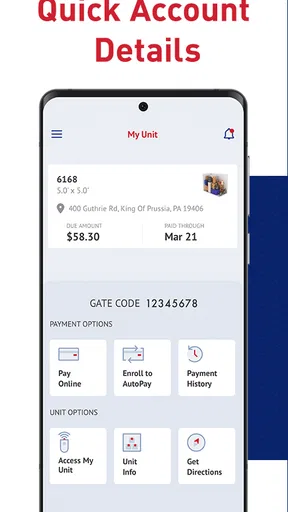
For a customer who checks a unit occasionally, the experience should feel more direct than searching through email for an old message or opening a mobile browser and signing in from scratch. The practical benefit is strongest when the task is simple and time-sensitive: confirming account information before a visit, handling a routine account action, or making sure you are looking at the correct storage relationship rather than relying on memory.
I would still keep expectations realistic. The app’s purpose does not make every storage task instant. Your connection, account state, and the complexity of the action can affect how quickly anything responds. A clean mobile route is helpful, but it cannot remove the physical parts of storage management, such as finding a box, loading a vehicle, or speaking with staff when an account issue needs human attention.
The current release is version 3.2.7, and that matters mainly because users should keep the app updated when possible. Updates can improve compatibility and smooth out problems that appear on newer phones, even though an update should not be treated as a guarantee of perfect performance. I see the version information as a reminder to avoid judging the whole service from an old installation that has been left untouched.
Worth Reading Before You Choose

EA SPORTS FC Mobile 26 Is a Bigger Football Game, but It Takes Time

Flipboard Shows What News Apps Must Do Beyond the Feed

Switching to Android Auto Means Rethinking Your Driving Routine

Google Calendar Makes a Crowded Week Easier to Manage

Ludo King Makes the Most of the Minutes Between Plans

Baby Panda World Brings Quick Play to Modern Phones, but Its Game Library Feels Busy
What happens when usage becomes heavier
The app is likely to feel most demanding when several account-related actions happen close together rather than during a single quick check. For example, imagine leaving work, opening the app to review your storage details, switching between account information and another task, and then returning later from a weak mobile connection. That is where loading delays, expired sessions, or a need to repeat a step become more noticeable than they would during a calm test at home.
My advice is to prepare before a time-critical visit. Open the app while you still have a reliable connection, review the information you need, and avoid assuming that every detail will remain available if you enter an area with poor reception. This is not a criticism unique to CubeSmart Self Storage; mobile account tools depend on connectivity. However, storage visits often happen in large facilities, parking areas, or places where reception may not be consistent, so planning makes a real difference.
Another useful habit is separating account preparation from physical work. If I were organizing a move, I would use the app before loading the vehicle, confirm the relevant account details, and then concentrate on the boxes. That workflow reduces the chance of standing beside a full car while trying to solve an administrative problem. The app is best used as a preparation tool, not as something to explore for the first time when the day is already hectic.
People managing more than one storage responsibility should also slow down before confirming anything. A compact mobile interface can make accounts or locations feel similar when you are moving quickly. I would verify the location and the action on screen instead of relying on a remembered unit name. That small pause is an important trade-off: mobile convenience saves time, but a larger browser view may be easier when the account situation is complicated.
Stability and recovering from interruptions
For this type of app, reliability is less about constant entertainment-style activity and more about whether a routine task survives interruptions. A phone call, a locked screen, a weak signal, or switching to another app can all happen naturally while managing storage. I prefer an app that lets me return to the task without confusion, but I also avoid assuming that an interrupted action completed unless the result is clearly shown.
The safest recovery habit is simple: after reconnecting or reopening the app, check the account state before trying the same action again. Repeating a payment or account request immediately after a loading interruption can create uncertainty about whether the first attempt worked. If the screen does not make the result clear, I would save any confirmation shown and contact CubeSmart support rather than repeatedly tapping.
This is where the app’s average rating of 3.3 from roughly 980 ratings gives potential users a useful signal. It suggests a mixed experience rather than universal smoothness, so I would not recommend relying on the app alone for a last-minute, high-consequence task. The rating does not tell me exactly which issue affected each person, but it does support a cautious approach: use the app for convenience while keeping a backup plan for important account matters.
The app has received around 520 written reviews, which means there is enough public feedback for prospective users to recognize that experiences vary. I would read that feedback with context instead of treating every complaint as proof of a permanent problem. Phone models, connection quality, account situations, and app versions can all change the experience. Still, the overall signal reinforces my view that the app is useful as a channel, not a substitute for every other way of resolving a storage issue.
Phone and operating-system considerations
CubeSmart Self Storage supports devices running Android 7.0 or later. That is helpful for people using older Android phones, but compatibility alone does not tell us how comfortable the app will feel on every device. An older phone may open the app successfully while taking longer to switch screens or recover after multitasking. A newer device may feel more responsive, yet its performance can still be affected by storage space, background activity, or network conditions.
For a basic storage account workflow, I would not expect the app to demand the same resources as a game, video editor, or navigation tool. That makes it a reasonable candidate for a secondary phone or an older everyday device, provided the operating system is supported and the phone remains stable in general. I would avoid installing it on a device that is already nearly full or frequently closes apps in the background, because those symptoms can make any account app feel unreliable.
There is also a practical privacy and device-sharing question. If several people use the same phone, I would make sure the account is protected by the phone’s own lock and would sign out or switch users when appropriate. Storage information may not look sensitive at first, but account access can still matter. The app’s age rating is Everyone, which describes its broad suitability, not a recommendation to leave an account open on an unlocked shared device.
Users on iOS should check the current App Store compatibility details before installing, while Android users can compare their system version with the stated minimum. I would also avoid judging performance immediately after a major operating-system update; giving the app a fresh launch and checking for its latest release is a sensible first step if something feels different.
Where it beats the usual alternatives
The usual alternative is a mobile browser. A browser is more flexible and may be easier when you need to research several storage companies, compare locations, or view a wider account page. It is also a better choice when you are using a computer and need to manage several pieces of information at once. CubeSmart Self Storage has the advantage when I want a focused, repeatable route to my existing storage relationship without navigating a general website each time.
Another alternative is calling the facility or visiting the office. Human help is clearly better for unusual account questions, disputes, access problems, or situations where the app does not explain what happened. The app wins for convenience when the task is routine and I already know what I need. It loses when the issue depends on judgment, local context, or a conversation with staff.
A notes app or spreadsheet can complement the service but cannot replace it. I might use one to record what is inside each box, especially if I am managing a move or helping a family member. That is a valuable combination: use CubeSmart Self Storage for account-related tasks and a separate inventory method for personal organization. Trying to force the storage app to become a complete household catalog would be the wrong expectation.
Three workflows that make the app more useful
First, I would create a short pre-visit routine. Before leaving home, open the app on a dependable connection, confirm the account or location you need, and note any information that will matter during the visit. This turns the phone into a preparation checkpoint instead of a rescue tool used after a problem has already appeared.
Second, I would pair the app with a simple inventory system. Use consistent labels such as room and box number in your notes, then use the storage app only for the account side of the visit. The trade-off is that you maintain two places for information, but the separation is clearer and more practical than expecting one service to manage both billing-related tasks and the contents of every container.
Third, I would establish a recovery rule for interruptions: never repeat an uncertain action until I have checked whether the account changed. I would reopen the app, look for a confirmation or updated status, and only then decide whether to try again. This is a small habit, but it is more valuable than simply tapping faster when a screen appears stuck.
Who should use it, and who should skip it?
I would recommend CubeSmart Self Storage to existing CubeSmart customers who want a convenient mobile companion for ordinary account management. It is especially suitable for people who visit their unit irregularly and do not want to remember a web address, search old messages, or call every time they need to check something routine. It can also help family members who share responsibility for a storage unit and need a consistent digital starting point.
I would be more cautious about recommending it as the only tool for a business with complex storage administration. If you need detailed inventory control, team permissions, audit trails, or broad reporting, a dedicated business system or desktop workflow will probably be stronger. The app’s focused nature is helpful for personal convenience, but it may feel limited when storage becomes part of a larger operational process.
I would also skip it if you do not use CubeSmart. Installing a company-specific account app without an active relationship gives you little practical value. In that situation, a browser is better for comparing providers, locations, and terms because it keeps your research broader. The app makes sense after the service relationship exists, not as a general-purpose storage marketplace.
My performance verdict after using it
CubeSmart Self Storage succeeds when I treat it as a focused shortcut: open it before a visit, handle a familiar account task, and keep the browser or phone nearby for exceptions. Its resource demands should be modest compared with demanding mobile software, and Android support from version 7.0 makes it accessible to many older devices. The more important performance variables are connection quality, phone condition, and how clearly the app recovers when an action is interrupted.
I like the convenience, but the mixed average rating means I would not describe the experience as universally dependable. My strongest recommendation is to use it proactively rather than under pressure. Prepare while connected, verify the result of important actions, and keep a second support route for anything that affects access or account status.
With more than 100,000 installs, it is clearly reaching a substantial group of storage customers, and its free pricing removes the main barrier to trying it. Even so, popularity does not make it the right tool for everyone. The best reason to install CubeSmart Self Storage is simple: it can make ordinary CubeSmart account tasks less cumbersome, provided you use it as a convenience layer rather than your only safety net.
My final view is cautiously positive. I would keep it on my phone if I rented a CubeSmart space and wanted a direct mobile route for routine management. I would not depend on it alone during a complicated move, a weak-signal visit, or an uncertain account situation. For the right customer, that balance is perfectly reasonable: the app saves effort on normal days, while the browser and staff remain important when the situation stops being normal.
Pros
- Manage reservations and payments from your phone.
- Find CubeSmart locations and contact facility staff quickly.
- Digital access features may simplify entry at participating facilities.
- View account details without visiting the storage office.
- Useful reminders can help keep storage payments organized.
Cons
- Features may vary depending on the CubeSmart facility.
- Some users may still need staff assistance for account changes.
- App usefulness is limited if your facility lacks digital access.
- Payment or login issues can interrupt time-sensitive account tasks.
- Storage rates and additional fees are not always obvious in the app.
FAQs for CubeSmart Self Storage
What is CubeSmart Self Storage, and what can I do with the app?
CubeSmart Self Storage is the mobile companion for customers who rent a storage unit from CubeSmart. After signing in, you can typically review account and unit information, check payment details, make or schedule rent payments, manage billing methods, and find facility-related information. The exact options may vary by location, account type, and app version, so some services might still require contacting the local store or using the company website.
Can I rent a storage unit through the CubeSmart app?
The app is mainly designed to help existing CubeSmart customers manage their storage accounts, rather than replace every step of the rental process. Depending on the current version and your selected facility, you may be able to browse locations, view available units, or begin a rental request. Availability, pricing, promotions, insurance requirements, and move-in procedures differ by facility, so review the final terms carefully before completing a reservation.
How can I pay my CubeSmart storage bill in the app?
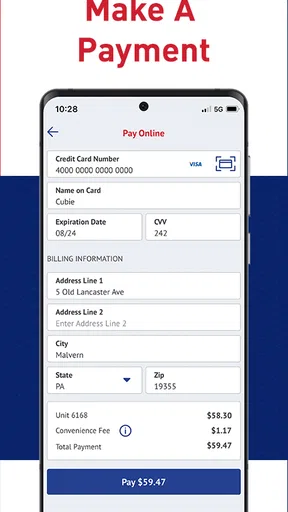
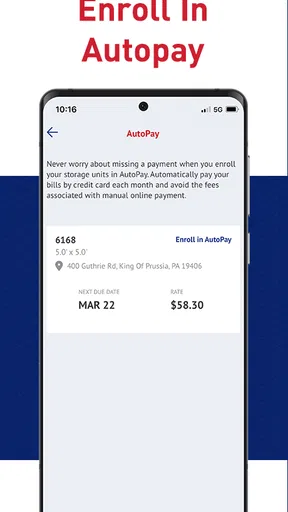
Once your account is connected, the app may allow you to view your balance, make a one-time payment, enroll in recurring payments, or update a saved payment method. Before confirming a transaction, check the amount, due date, and payment account carefully. Payment features can depend on your account status and location. Keep the confirmation for your records, especially if you are paying close to the due date.
Does the CubeSmart app let me access the storage facility or open my unit remotely?
Facility access features are not necessarily available at every CubeSmart location. Some properties may support digital entry, gate access, or other technology-based options, while others continue to use a personal access code or traditional keypad. If your facility supports mobile access, the app may request Bluetooth, location, or notification permissions. Always follow the facility’s access hours and contact the local office if entry does not work.
Is the CubeSmart Self Storage app free, and what should I know about privacy or account security?
Downloading the CubeSmart app is generally free, but renting a storage unit involves separate charges such as monthly rent, administrative fees, insurance or protection costs, and possible late or access-related fees. You will need an account and login credentials to use customer features. Protect your password, avoid signing in on shared devices, and review the app’s current privacy policy and requested permissions before granting access to personal or location information.


